Azure NetApp Files (ANF) offers a cost saving option where unused data blocks can be tiered off to blob storage to reduce costs. It is great for many use cases, but many assume that VDI/AVD user profiles, in the form of FSLogix containers, would not be a good workload. Through detailed testing I’ve been able to validate that FSLogix user profile data is indeed a great workload for ANF, even when cool access is enabled.
Initially, I also expected cool tiering to be an issue. To validate, we set up a lab with AVD and ANF. We then loaded up the profile with many GiBs of data and gave it time to cool off. Once the data was cool and moved to bloc storage, I logged in as the test user and it was just as fast as usual. The Azure ANF Metrics data confirmed that there was virtually no data transfer from cool to hot, and the cool data size metric stayed the same.
Below this numbered list is a screenshot of the total storage and cool storage during these tests. I’ve numbered several moments for clarity. The blue line represents the total data, magenta line is cool data, both in GiBs.
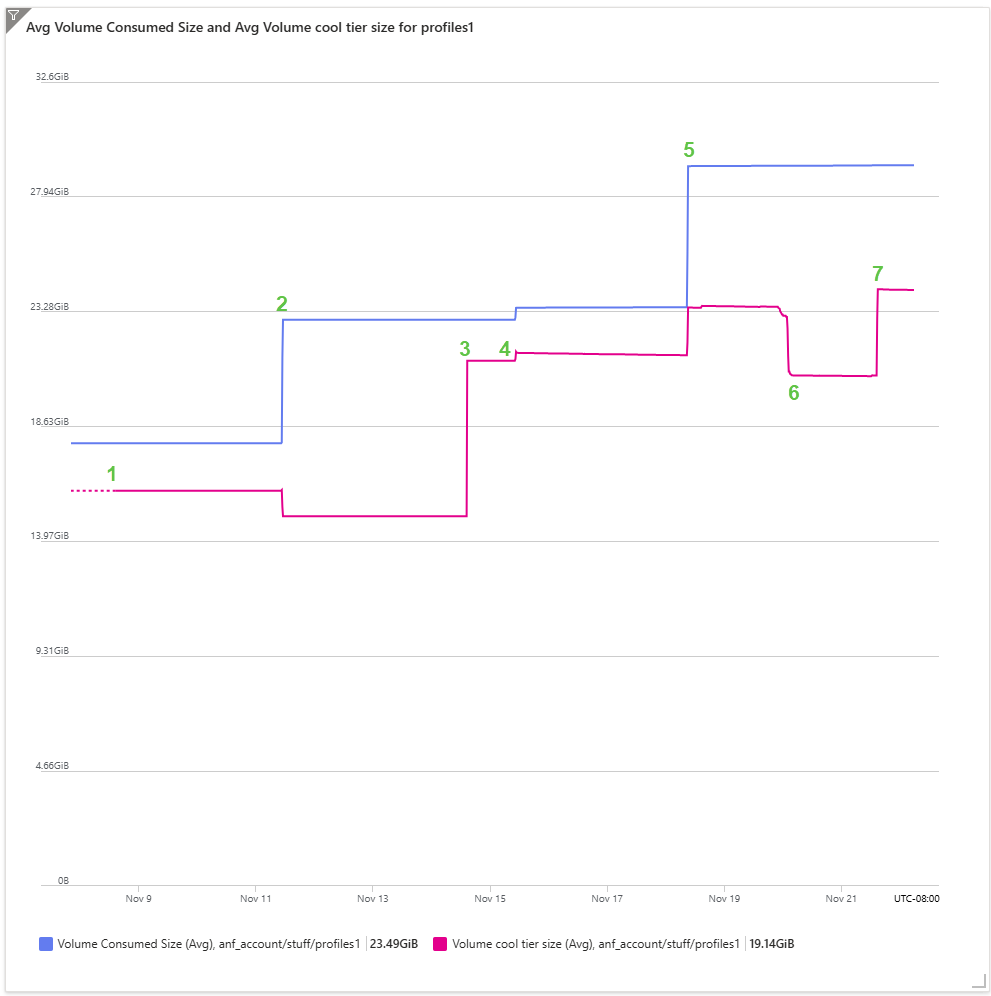
- We activated cool access tiering, the bits that were already cool instantly moved to cool tier, thus our first metrics data included with some data already on cool storage.
- I logged in and added several GBs of Linux ISO files to my user profile. I also touched some of the data in my profile, moving some data form cool back to hot.
- The Linux ISOs from step #1 remained untouched long enough and moved to cool tier storage.
- Prior to the small setup increase, I logged in and confirmed that my login speed wasn’t impacted by the presence of cool data. I also confirmed that the cool data in my profile did not return to hot. The small increase in both lines just after #4 comes from testing a script I made to write empty .txt files with a defined size. The cool and hot numbers jump simultaneously because the blocks within the “thin” .txt. file were untouched and ANF immediatly viewed those blocks as cool.
- I created much more data in my profile. Some were “thick” text files of 1GiB each with actual garbage data in them, others were “thin” 1GiB .txt files as discussed in #4. The increase in cool storage represents those “thin” files while the “thick” files don’t get to cool storage until #7.
- This is where I did the “read from cool” testing. I copied ISOs that had been in cool over to C:\temp on the VM to benchmark the speed impact on end user experience. Data read was clearly slower but not in a way that was particularly disruptive, it ended up running at about 30MB/s. A 1.2gb ISO took about 43 seconds to transfer out of cool to the VM local disk. Further testing estimates that a typical 10Mb office document would experience a one-time delay of 400ms when opening from cool. Screenshot Link
- As a point of reference, I did a similar test using OneDrive Files On-Demand. On a 1Gig internet connection, the same file took about 76 seconds to re-download to my local device. OneDrive Files On-Demand seeks to solve a similar problem for users on physical devices and I’d argue is generally accepted as a good compromise between data consumption and data accessibility. Screenshot Link
- The “thick” files generated in step #5 are moved to cool storage.
Based on this testing I was able to confirm that you can use cool access with ANF to reduce costs on FSLogix workloads. Mounting the FSLogix container at login dies not reheat the blocks on the disk and performance for standard user data is well within acceptable limits.
Pingback: Move FSLogix User Profiles Without Ruining your Weekend - Posted